Native macOS firewall

The network sentinel:
always know who is talking
to your Mac.

X-Varco watches every connection, app by app: a green, amber or red shield in the menu bar tells you how things are going, and when something looks off you decide with one click — allow or block.

Underneath: an Apple system extension (Network Extension) that examines flows at socket level, per-application rules, quarantine for freshly installed software, tracker-domain blocking, and a sentinel that recognizes sixteen kinds of cyber attack and stops the source.

🖥️ 100% native (SwiftUI) 🔒 Everything stays on your Mac 🚫 No account, no cloud
Green light: all clear
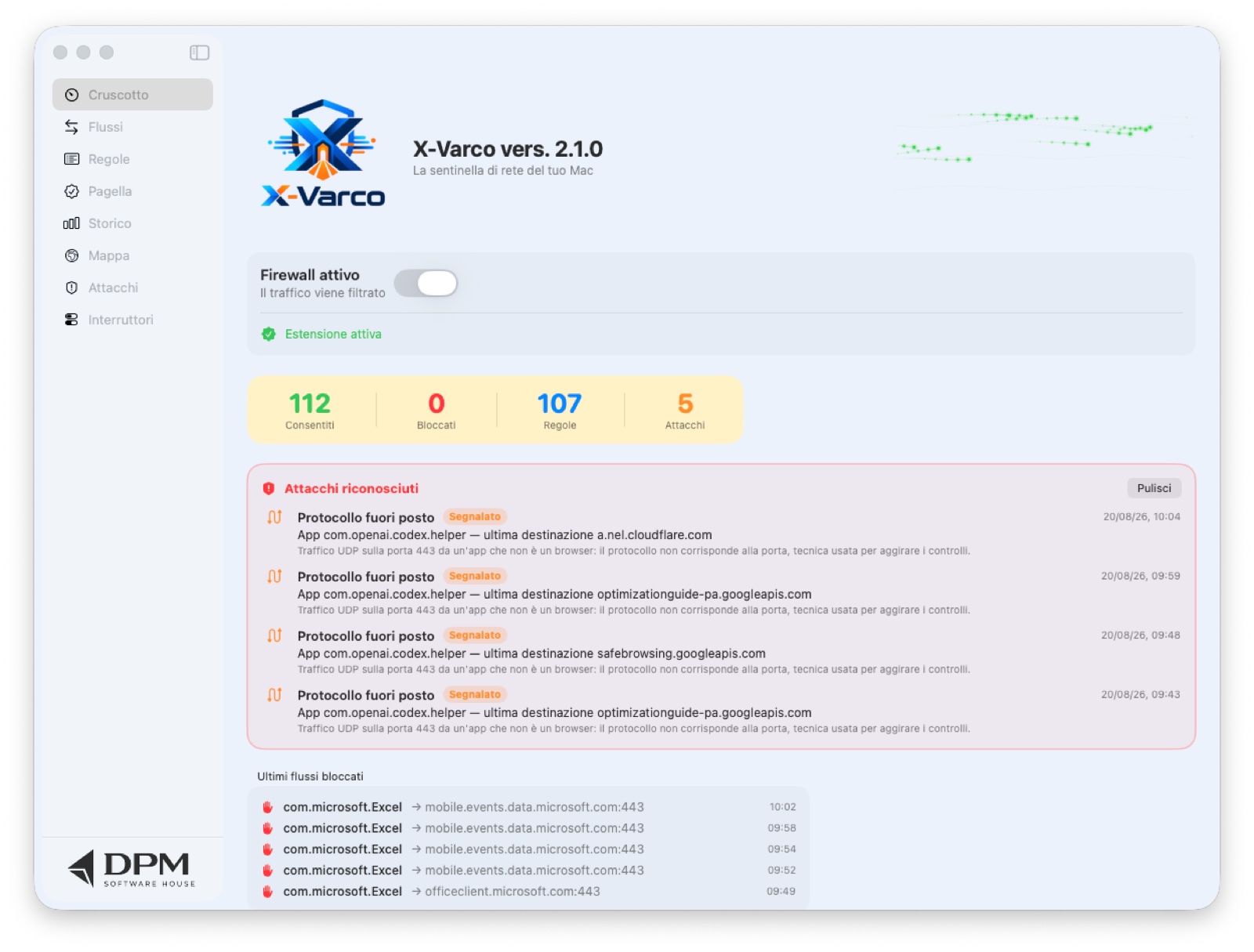
The X-Varco Dashboard: traffic light, counters and quarantine
3 trackers blocked just now
Network Extension system extension SwiftUI interface macOS 15+ · Apple Silicon Per-application rules Sentinel: 16 attack types Tracker list: 3,536 domains
Everything it does

More than a firewall

A classic firewall opens and closes ports: it decides whether a connection may pass. X-Varco does that, and then keeps going: it recognizes who is talking (the app, not the port), how the network behaves over time, and whether that behaviour looks like an attack. In technical terms it is an application firewall combined with an IDS — an intrusion detection system — and a privacy monitor.

FeatureWhat it doesCategory
Per-application filterEvery connection is attributed to the app that opened it (code-signing identifier, not the file name) and decided by its rule.Firewall
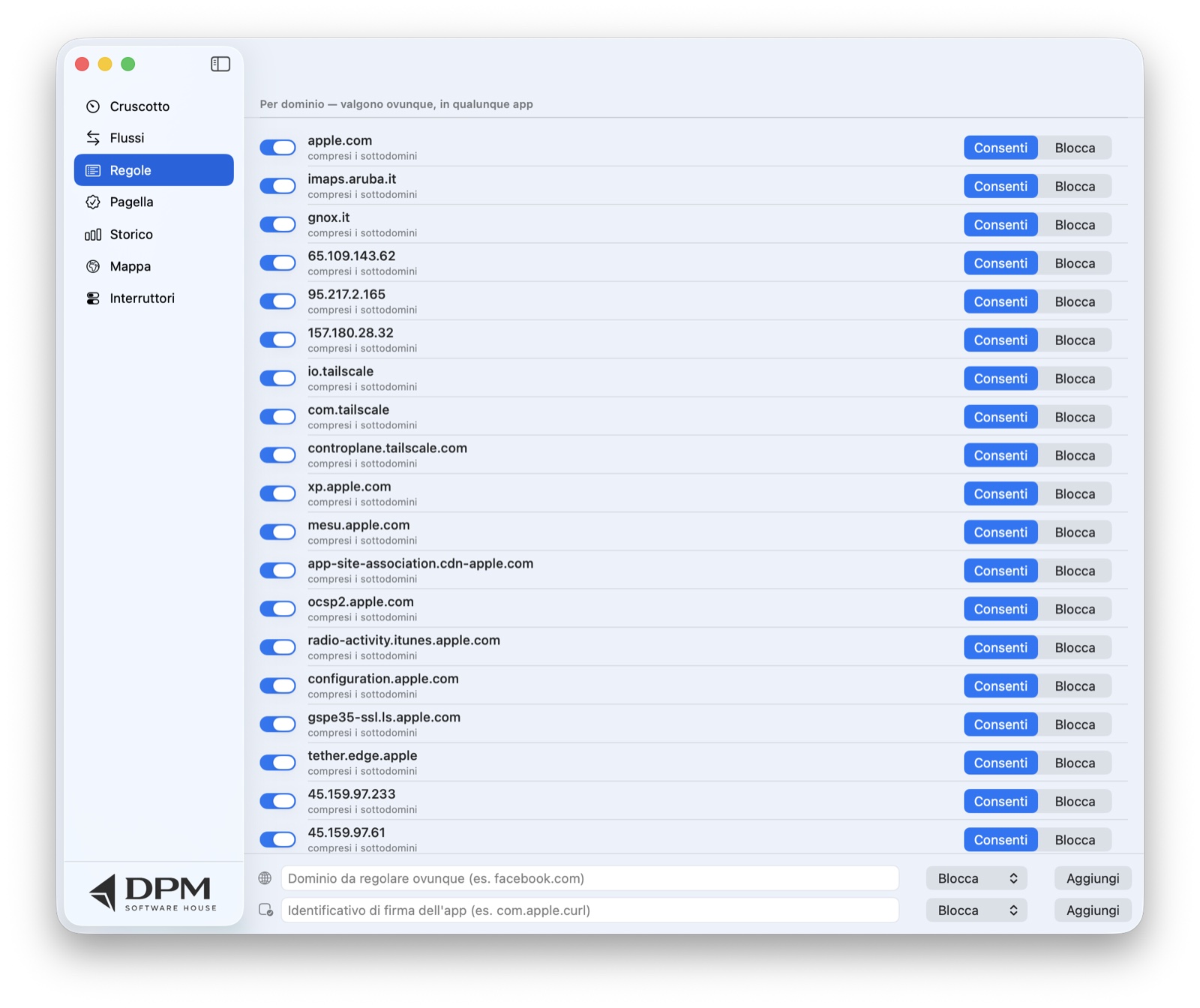
Domain rules«Block facebook.com everywhere»: applies in every app, subdomains included, and wins over any other decision.Firewall
Time windowsRules that apply only during certain hours (22:00 → 7:00 works: they cross midnight).Firewall
Inbound trafficAlso examines connections arriving at your Mac, not just outgoing ones.Firewall
Hold and askThe suspicious connection stays on hold (up to 60 seconds) until you decide: not blocked, not let through.Control
New-software quarantineNever-seen apps stay blocked for a few days, until you promote them.Protection
Tracker blocking3,536 advertising and tracking domains stopped at socket level, in every app — not just the browser.Privacy
Intrusion sentinel16 attack patterns recognized from network behaviour; blocks the source and lists it in the Attacks section.IDS
Updated C2 blocklistAbout 3,000 botnet command-and-control addresses (abuse.ch), blocked and refreshed automatically every day.IDS
Decide on sourcesFrom each attack badge you see the sources and choose, one by one, whether to allow or block them: the choice is recorded.Control
Anomaly alarmWarns you when a known app contacts a destination it has never used before.IDS
Privacy report cardA grade from A to D for every app, based on how many connections go to trackers.Privacy
World mapWhere your connections end up, with on-board geolocation; a red thread toward attack sources.Transparency
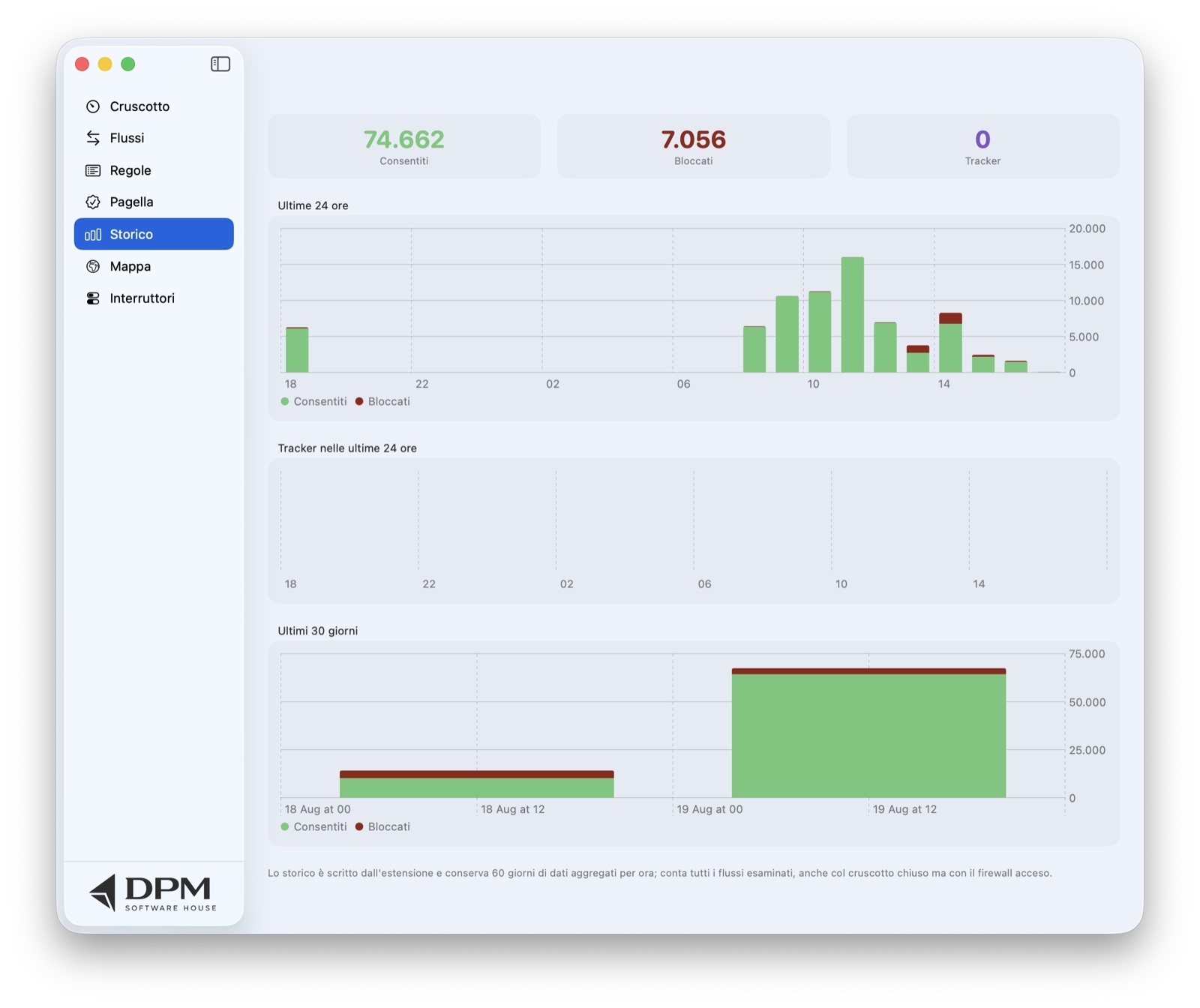
60-day historyHourly and daily charts of allowed, blocked and tracker flows, even with the dashboard closed.Transparency
Traffic light and radarGreen/amber/red shield in the menu bar with an animated thread; on the Dashboard, a sonar radar or a river of particles showing flows in real time.Interface
AI explanationsThe «Explain» button tells you in plain words what a connection is doing (optional, with your own API key).Help
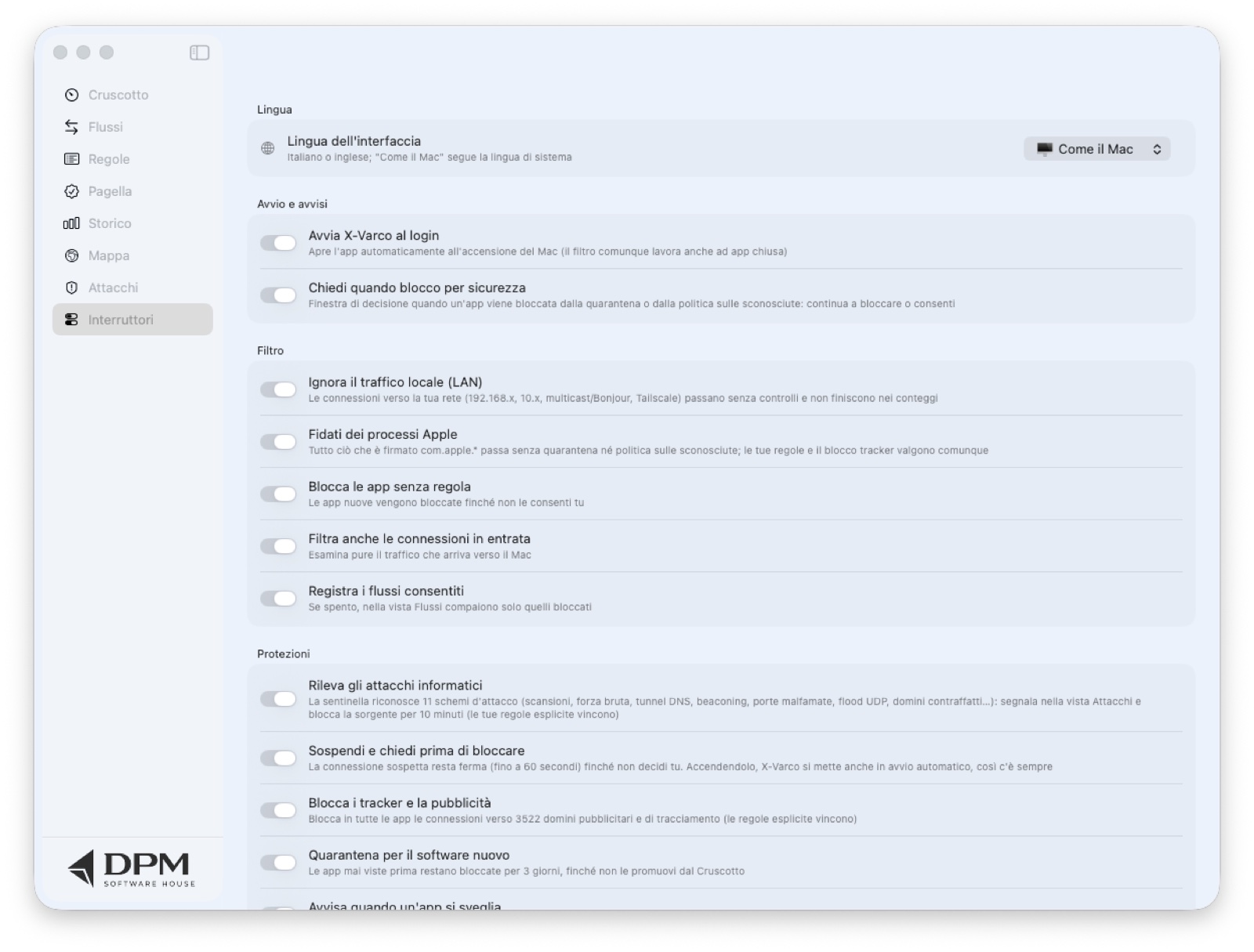
Italian and EnglishFully bilingual interface, with the language chosen in Switches or taken from the system.Interface

A firewall watches the port

Classic rules talk about addresses and port numbers. Useful, but modern malware uses port 443 like everyone else: it passes the check and looks just like good traffic.

X-Varco watches the behaviour

It counts destinations, measures the rhythm of contacts, session duration, the entropy of host names. These are the clues that give away scans, tunnels and command channels — even on the «right» ports.

And leaves you the last word

Every detection is explained in plain language, with the source in clear text and two buttons: allow or block. No black box: your rules always beat the automation.

How it works

Three moves, then it takes over

No configuration to study: X-Varco starts in observation mode and only gets as strict as you want it to.

1

Install and approve

Open the app, one click on "Install extension", approve it in System Settings — and the filter lives inside macOS, not as a program running on the side.

2

The traffic light talks to you

A shield in the menu bar: green means all good, amber some blocks, red a burst of blocks. One click shows the latest flows, without opening the app.

3

Decide with one click

With "ask first" on, the suspicious connection stays on hold — not blocked, not let through — until you choose: allow or block. Your choice becomes a rule, for good.

Everyday control

Per-app and per-domain rules, quarantine and schedules

Every application gets its own rule: allow or block, always or only within a time window (rules cross midnight — 22:00 → 7:00 works). Domain rules apply everywhere: "block facebook.com" also stops subdomains, in any app, and wins over every other decision. And freshly installed software goes into quarantine: blocked for the first few days until you promote it.

Green — all clear Amber — recent blocks Red — burst of blocks
  • "Block trackers" switch: stops 3,536 advertising domains in every app, not just the browser
  • "App waking up" alarm: notifies you when a known program contacts a never-seen destination
  • Decision window on safety blocks: allow or keep blocking, right there
  • Automatic launch at login, if you want it — and the filter works even with the app closed
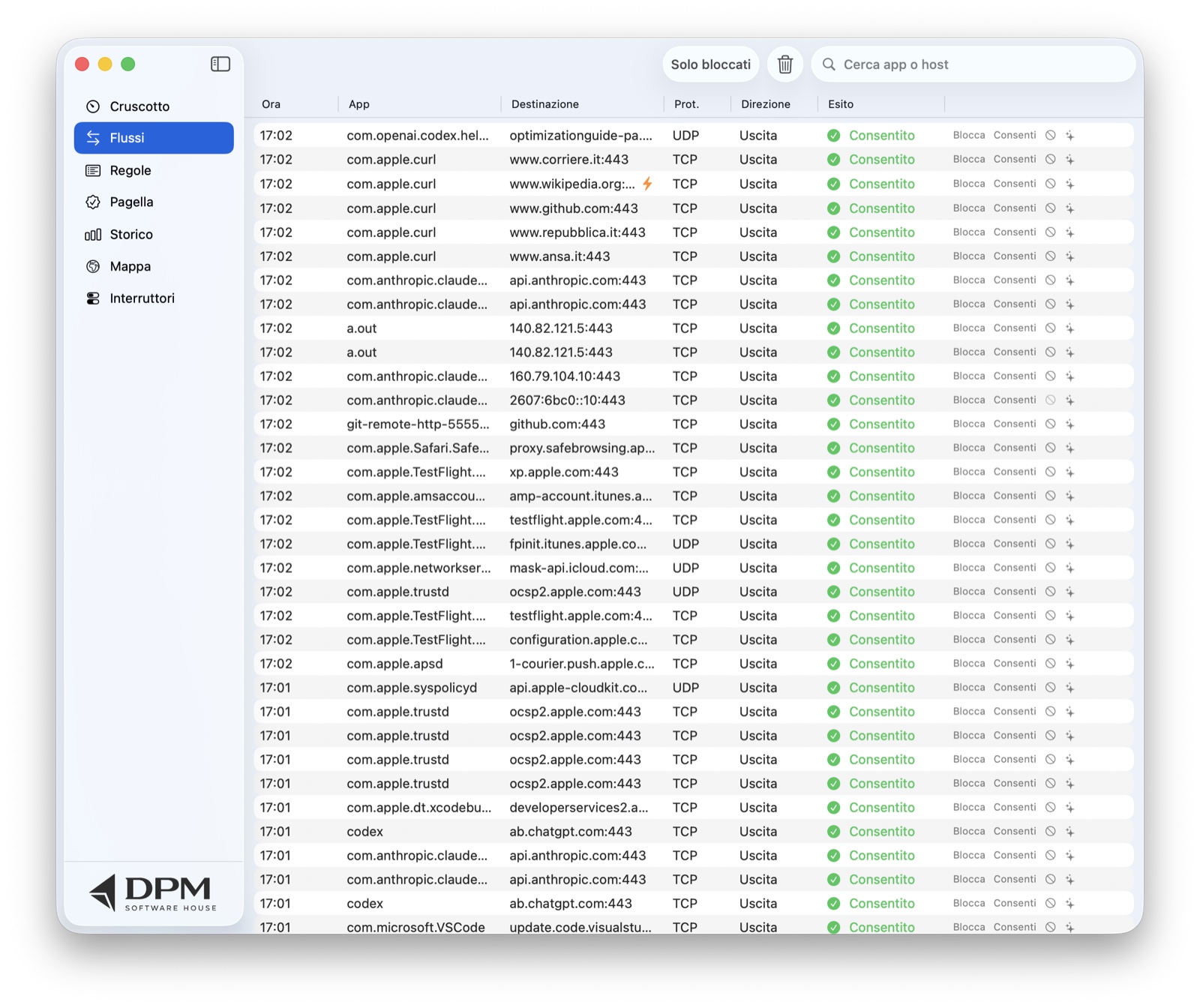
The X-Varco Flows view: every connection with its outcome and decision buttons
Transparency

Privacy report card, world map and history

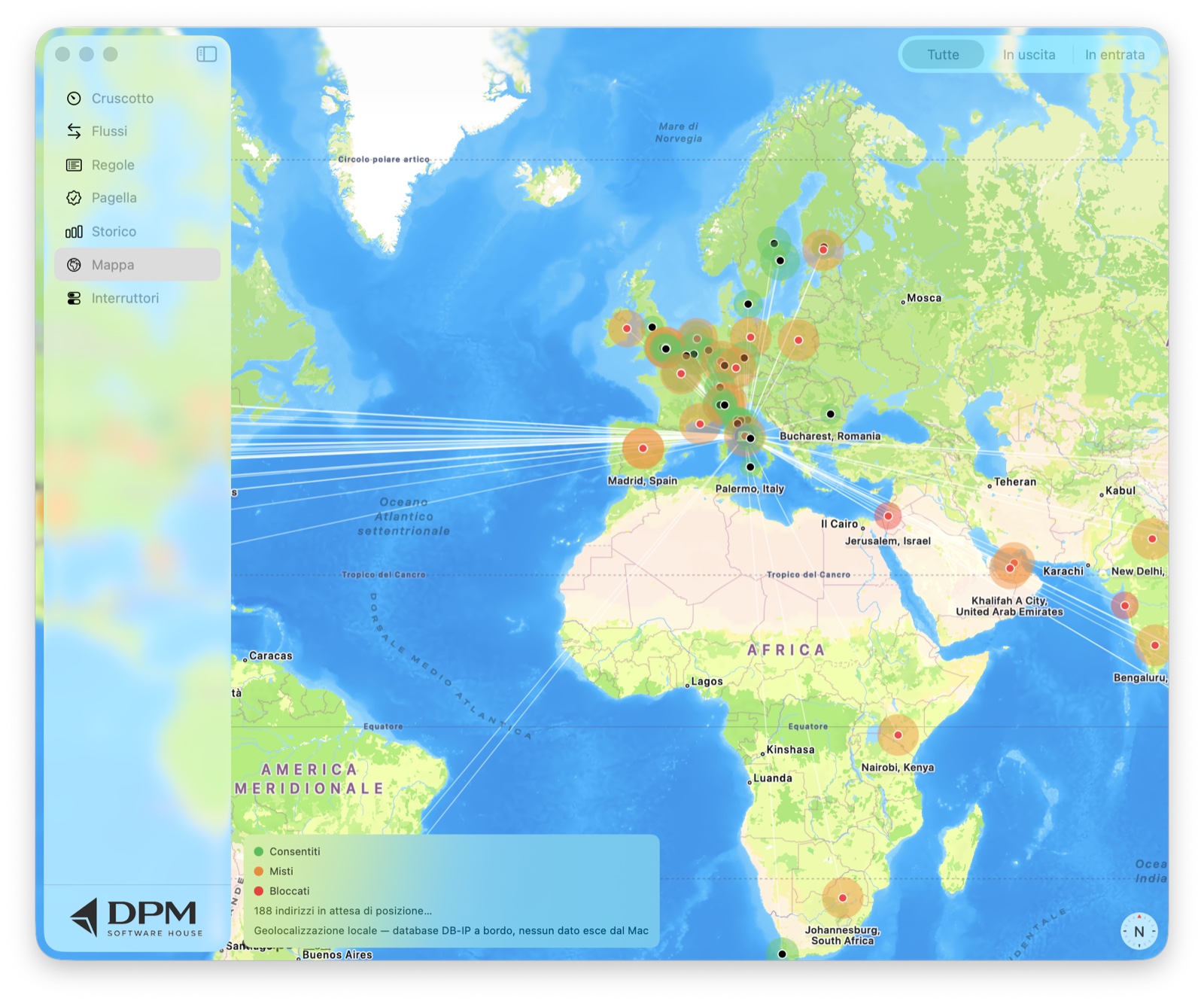
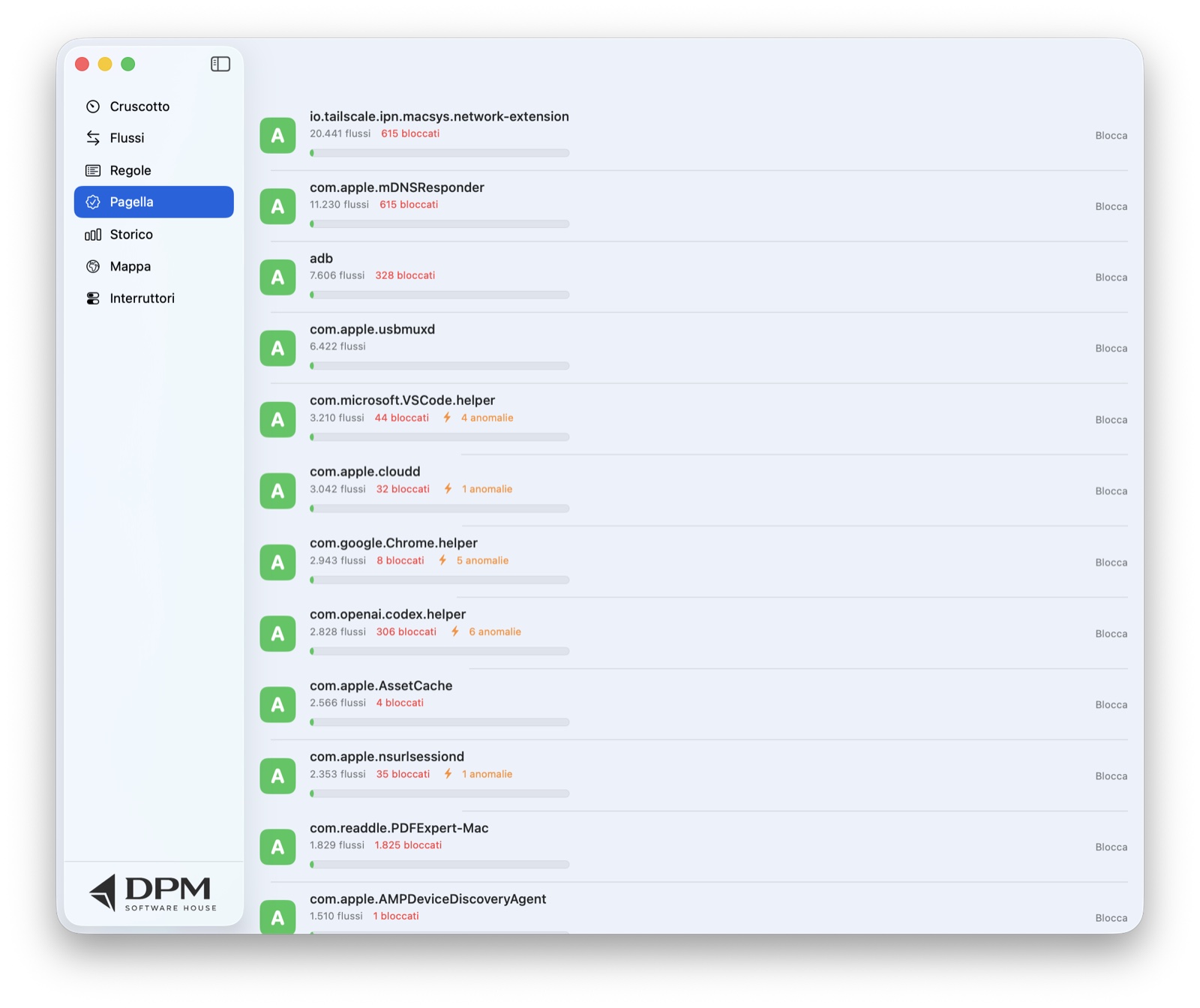
Every app gets a grade from A to D based on how many of its connections go to tracking domains. The world map shows where your apps connect — white threads from your Mac to every destination, red dots where something was blocked, click a dot for the server name and IP address. And the history keeps 60 days of hourly and daily charts.

  • "Explain" button: AI tells you in plain language what that connection is probably doing
  • Geolocation with an on-board database: no address ever leaves your Mac
  • Charts for the last 24 hours and the last 30 days: allowed, blocked, trackers
  • The report card counts the whole history, even with the dashboard closed
The X-Varco Map: white threads from your Mac to every destination in the world
Intrusion sentinel

Recognizes attacks, reports them, stops them

Not just a firewall that opens and closes ports: X-Varco watches how the network behaves and recognizes sixteen attack patterns — from flow metadata alone, never reading the content of your communications. When it spots one it shows it in the Attacks section, alerts you, and blocks the source for ten minutes; from the badge you can then decide source by source whether to allow or block it (your rules always stay sovereign).

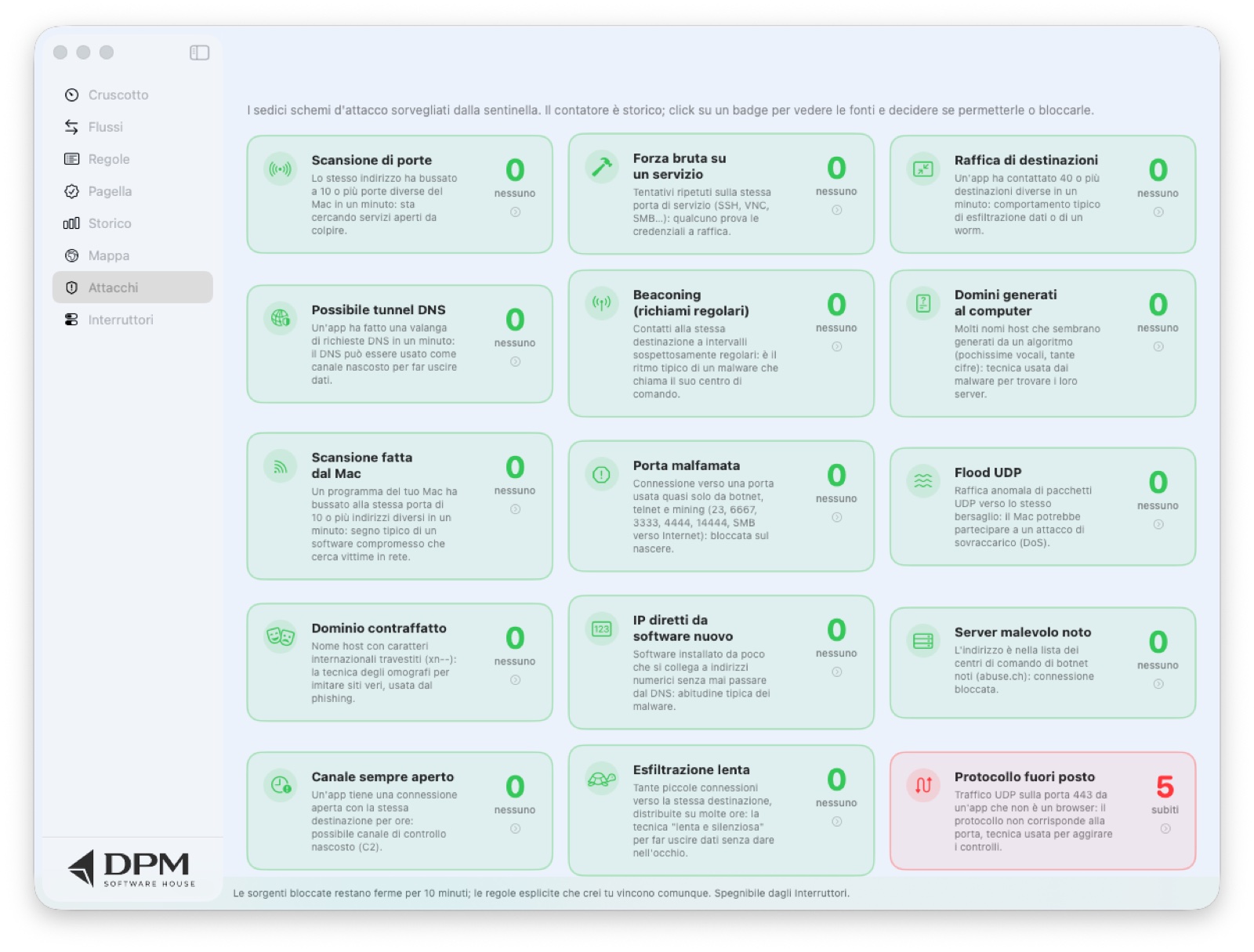
The X-Varco Attacks section: eleven cards, one per attack type, each with a lifetime counter
The Attacks section

Sixteen sentinels, always on watch

Every attack type has its own card: green until it has never happened, red as soon as it is suffered, with a lifetime counter that never resets. On the Dashboard, the most recent alerts appear front and center with the app involved, the destination, and what X-Varco did (reported or source blocked).

  • Automatic source block for 10 minutes, then it retries
  • System notification with the attack type and what was done
  • On the map, the thread to the offending server turns red
  • VPNs and system processes are reported but never blocked

📡 Port scan

The same address knocks on many different ports of your Mac: it is looking for open services to hit.

≥10 ports in 60 s · source blocked

🔨 Brute force

Repeated attempts on the same service port (SSH, VNC, SMB, RDP, databases): someone is trying credentials in bursts.

≥6 attempts in 60 s · source blocked

📤 Destination burst

An app contacts a great many different servers within seconds: the typical behaviour of data exfiltration or a spreading worm.

≥40 destinations in 60 s · app contained

🕳️ DNS tunnel

An avalanche of DNS requests from a single app: DNS passes almost everywhere, which is why it gets used as a hidden channel to smuggle data out.

≥30 requests in 60 s · app contained

📻 Beaconing

Contacts to the same destination at suspiciously regular intervals: the rhythm with which malware calls its command server.

regularity score ≥0.78 (RITA method)

🎲 Generated domains (DGA)

Many high-entropy host names — almost no vowels, lots of digits: the algorithms malware uses to generate its servers' domains.

≥5 anomalous names in 5 min

📶 Scan from this Mac

A program on your Mac knocks on the same port of many different addresses: a sign it is compromised and hunting for victims.

≥10 addresses in 60 s · app contained

⛔ Notorious port

Connection to ports used almost only by botnets, cleartext telnet and crypto mining, or SMB exposed to the Internet.

23, 6667, 3333, 4444, 14444, 445 → blocked

🌊 UDP flood

Abnormal burst of UDP packets toward a single target: your Mac may have been enlisted into an overload (DoS) attack.

≥80 packets in 60 s · app contained

🎭 Spoofed domain

Host name with disguised international characters (xn-- homographs) imitating a real site: the classic phishing trap.

reported

🔢 Direct IPs from new software

A recently installed app connects to numeric addresses without ever using DNS: typical malware habit, avoiding traceable names.

≥3 addresses in 10 min (app <24 h)

🗄️ Known malicious server

The address is on the list of botnet command-and-control servers tracked by abuse.ch: ~3,000 addresses refreshed daily.

connection blocked

⏱️ Always-open channel

An app keeps the same destination alive for hours on end: the signature of an interactive control channel (reverse shell, C2).

≥5 hours of presence out of 6 · browsers excluded

🐢 Slow exfiltration

Many small connections to the same destination spread over many hours: the «low and slow» technique that escapes instant thresholds.

≥150 flows across ≥8 different hours

🔀 Protocol out of place

UDP traffic on port 443 from an app that is not a browser: the protocol does not match the port, a trick used to slip by unnoticed.

reported · browsers and system excluded

🖧 LAN lateral movement

An app knocks on the service ports of many computers on your network: the attempt to spread to nearby devices after taking your Mac.

≥8 computers in 10 min · reported
Where these detections come from. The thresholds and methods are drawn from the public literature on flow-based intrusion detection, adapted to what a macOS network extension can observe — that is, flow metadata only, never the content of your communications:
For those who want details

Under the hood

X-Varco is not a wrapper: it is a firewall built on Apple's system APIs, with its technical choices documented below.

🧩 System extension

The filter is a NEFilterDataProvider (Network Extension framework) running as a signed, user-approved system extension: macOS hands it every new socket flow — TCP and UDP, outbound and inbound — and the extension answers with an allow/drop verdict before the first byte leaves.

The hook is total (NEFilterSettings on every network, every port): no partial lists, no proxies. With "ask first" the verdict is pause: the system keeps the flow on hold until the user decides (60s timeout → block).

🪪 App identity

On macOS a flow does not carry the bundle id: X-Varco traces the app from the process's audit token via SecTask, deriving the code-signing identifier — stable across versions and not forgeable, because Apple's signature vouches for it.

A bounded cache avoids redoing the cryptographic work on every connection.

🔁 App ↔ filter over XPC

Dashboard and extension talk over an XPC mach service in the app group: the app pushes rules and settings to the filter and receives flows in real time; the history travels the other way.

No shared files: the extension runs as root and cannot see the user's container — a classic trap of this architecture, solved here at the root.

🗂️ Aggregated history

The extension keeps aggregates per hour (allowed/blocked/trackers), per app and per IP address, pruned to 60 days and saved periodically: charts and report card never start from zero and the disk cost stays at a few KB.

Each app's first appearance feeds the quarantine; its usual destinations feed the anomaly alarm.

🛰️ Intrusion sentinel

Sliding in-memory windows count ports, destinations, DNS requests, durations and timings for each source: cross the thresholds and one of the sixteen detections fires. Inbound addresses recognized as attackers are put under a timed full block; outbound apps under containment — but never Apple processes, VPN infrastructure, or apps with an «allow» rule of yours.

The generated-domain detector measures the name's entropy (vowels, digits, length) and is tuned not to mistake IP and IPv6 addresses for a malware's domains. The abuse.ch C2 address list re-downloads itself daily and travels to the extension over XPC, because the extension runs as root and cannot see the user's container.

📈 Flow FFT spectrum

The analyzer on the Dashboard is a real Fourier transform (Accelerate/vDSP) over the connection rate through time: the traffic's periodicities — updates, beaconing, tunnels — show up as lit bands, with graduated Hz and amplitude axes.

🛑 Tracker blocking

Peter Lowe's list (3,536 advertising and tracking domains) is embedded in the app and the extension: it classifies flows for the report card and, with the switch on, blocks them at socket level with domain-suffix matching.

The same matching serves the user's domain rules ("block facebook.com everywhere"), which take priority over everything else.

🗺️ Map and geolocation

Fully local geolocation: the DB-IP City Lite database is embedded in the app and read by a purpose-built MMDB reader — no address ever leaves the Mac. The "My Mac" position uses the system location services, with explicit permission.

The map is native MapKit: dots aggregated by city, sized by traffic, polylines from your Mac to every destination.

🤖 AI explanations

The "Explain" button queries the Anthropic API (claude-opus-5 model) with the flow's metadata — app, destination, port, outcome, category — and returns two plain-language sentences for non-technical users.

Optional feature: it needs a personal API key, and without one the app works in full.

🖥️ Native app

Dashboard, flows, rules, report card, history (Swift Charts), map and switches are pure SwiftUI; the traffic light is a MenuBarExtra whose icon is redrawn on every state change.

System notifications for anomalies, an AppKit decision window on safety blocks, launch at login via SMAppService.

🔏 Signing and reliability

App and extension are signed with hardened runtime; the extension declares content-filter-provider and the app system-extension.install. The extension updates itself at every launch, with a build number that grows with each version.

Project generated with XcodeGen, versioned in git, reproducible builds.
The retroactive log keeps the latest 10,000 individual flows; for charts and the report card, the aggregates still cover 60 days with full hourly detail.
The geolocation database updates by itself when the new monthly edition comes out (~60 MB from db-ip.com); you can still force it with one click from the app.
The real thing

The screens, untouched

Real screenshots of X-Varco at work on a real Mac — no mockups.

Dashboard
Dashboard: traffic light, counters and quarantine
Flows
Flows in real time, with rules on the fly
Map
World map of your connections
Attacks
Attacks: sixteen sentinels with a lifetime counter
Report card
Privacy report card with per-app grades
History
History: hourly and daily charts
Rules
Per-app and per-domain rules
Switches
Switches: every feature has its own, language included
Frequently asked questions

What everyone asks

Is it an antivirus?

No: it is a firewall. It does not look for viruses in files — it watches network connections, app by app, and lets you decide who may talk to the outside. The two tools do different jobs and can coexist.

How is it installed?

You open the app, click "Install extension" once, and macOS asks for confirmation in System Settings — the operating system's own guarantee that the filter is the right one. From then on X-Varco works by itself, even with the dashboard closed. Requires macOS 15 or later.

Does it coexist with Little Snitch or a VPN?

Yes: macOS chains content filters in series, so X-Varco can work alongside other firewalls and VPNs (Tailscale included). A connection must pass every active check.

Does my data leave the Mac?

No. Rules, history, report card and geolocation live on your Mac (the location database is embedded in the app). The only feature that talks to the outside is the optional AI "Explain" — which uses your own key, if you choose to enable it.

Does it slow the network down?

Not perceptibly: the verdict on each new connection is an in-memory lookup (rules, domains, tracker list) measured in microseconds, done once when the flow opens — not on every packet.

Want X-Varco on your Mac?

Let's talk: a live demo is worth a thousand pages — traffic light, quarantine and map make sense in two minutes.